
How to Link PayPal to M-Pesa for Online Earnings in Kenya (2026)
PayPal to M-Pesa transfers offer the most convenient way for Kenyan freelancers, remote workers, and digital entrepreneurs to access their global online earnings. If you are receiving payments from international clients or platforms, you can quickly connect your accounts and withdraw your funds directly to your mobile phone.
In this guide, we’ll walk you through exactly how to set up the connection using the latest methods, including the new M-PESA Super App integration, and how to avoid common account linking errors.
What You Need Before You Begin
Before starting the PayPal to M-Pesa connection process, make sure you have the following ready:
- A Kenyan registered PayPal account.
- An active Safaricom M-Pesa line.
- Matching Names: The name on your Safaricom ID must exactly match the name on your PayPal account. This is the number one reason links fail.
Method 1: Link Using the M-PESA Super App (Recommended)
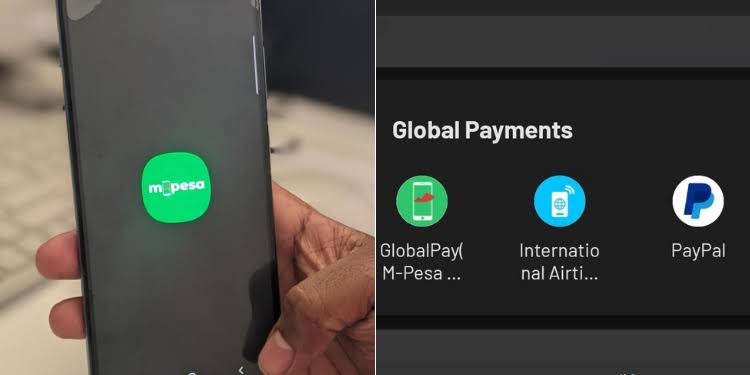
PayPal to M-Pesa integration is now built directly into the Safaricom M-PESA Super App, making it the fastest way to connect your accounts.
- Open the M-PESA Super App and log in with your M-Pesa PIN.
- Navigate to the Global Payments (or Transact) tab and select the PayPal mini-app.
- Tap Link Account.
- Enter your PayPal email address and password to log in.
- Accept the terms and authorize the link by entering your M-Pesa PIN. You will receive a confirmation SMS from Safaricom.
Method 2: Link via the Official Web Portal
PayPal to M-Pesa linking can also be done through a standard web browser if you don’t have the Super App installed.
- Visit the official portal at www.paypal-mobilemoney.com/m-pesa.
- Click “Get Started” and log in using your PayPal credentials.
- Enter your Safaricom mobile number.
- You will receive an SMS with a confirmation code. Enter this code on the website to complete the link.
How to Withdraw Your Online Earnings
PayPal to M-Pesa withdrawals are straightforward once the accounts are successfully connected.
- Open the M-PESA Super App and go to the PayPal section, or visit the Thunes web portal.
- Select Withdraw.
- Enter the amount in USD that you wish to transfer.
- Review the conversion rate and confirm. The funds will be converted to Kenyan Shillings (KES) and deposited into your M-Pesa wallet.
Frequently Asked Questions (FAQ)
How long does a PayPal to M-Pesa withdrawal take?
Most withdrawals are processed instantly or within a few minutes. However, larger transactions or initial transfers on new accounts can sometimes take up to 2 hours or a few calendar days to clear.
What are the limits and fees?
Safaricom applies a 3% fee on the daily foreign exchange rate for withdrawals. The standard M-Pesa transaction limits apply: you can withdraw up to KES 250,000 per transaction and KES 500,000 per day.
Why am I unable to link my accounts?
The most common issue is a name mismatch. If your M-Pesa is registered as “John Doe Smith” but your PayPal is just “John Smith,” the system will reject the link. Ensure both accounts share the exact same legal name.
Conclusion
PayPal to M-Pesa linking is an absolute game-changer for anyone making money online in Kenya. By taking five minutes to connect your accounts, you bypass the need for traditional bank wire delays and gain rapid access to your hard-earned money. Ensure your account names match exactly, use the official Safaricom or Thunes platforms, and you’ll be ready to withdraw your international earnings directly to your phone.