M-Pesa Paybill vs Till Number: What Businesses Must Know
If you run any kind of business in Kenya — a shop, a salon, a freelance practice, an online store, a rental property, a chama — you need to understand the difference between an M-Pesa Paybill and a Till Number before you collect your next payment. Choosing the wrong one costs you money, complicates your records, and quietly destroys the business credit history that determines your loan limits for years.
This guide explains exactly what each option is, what each one costs in real shillings, and which one your specific business should use — so you never lose a payment or a loan opportunity to the wrong setup.
What Is an M-Pesa Till Number? (And Who It Is Actually For)
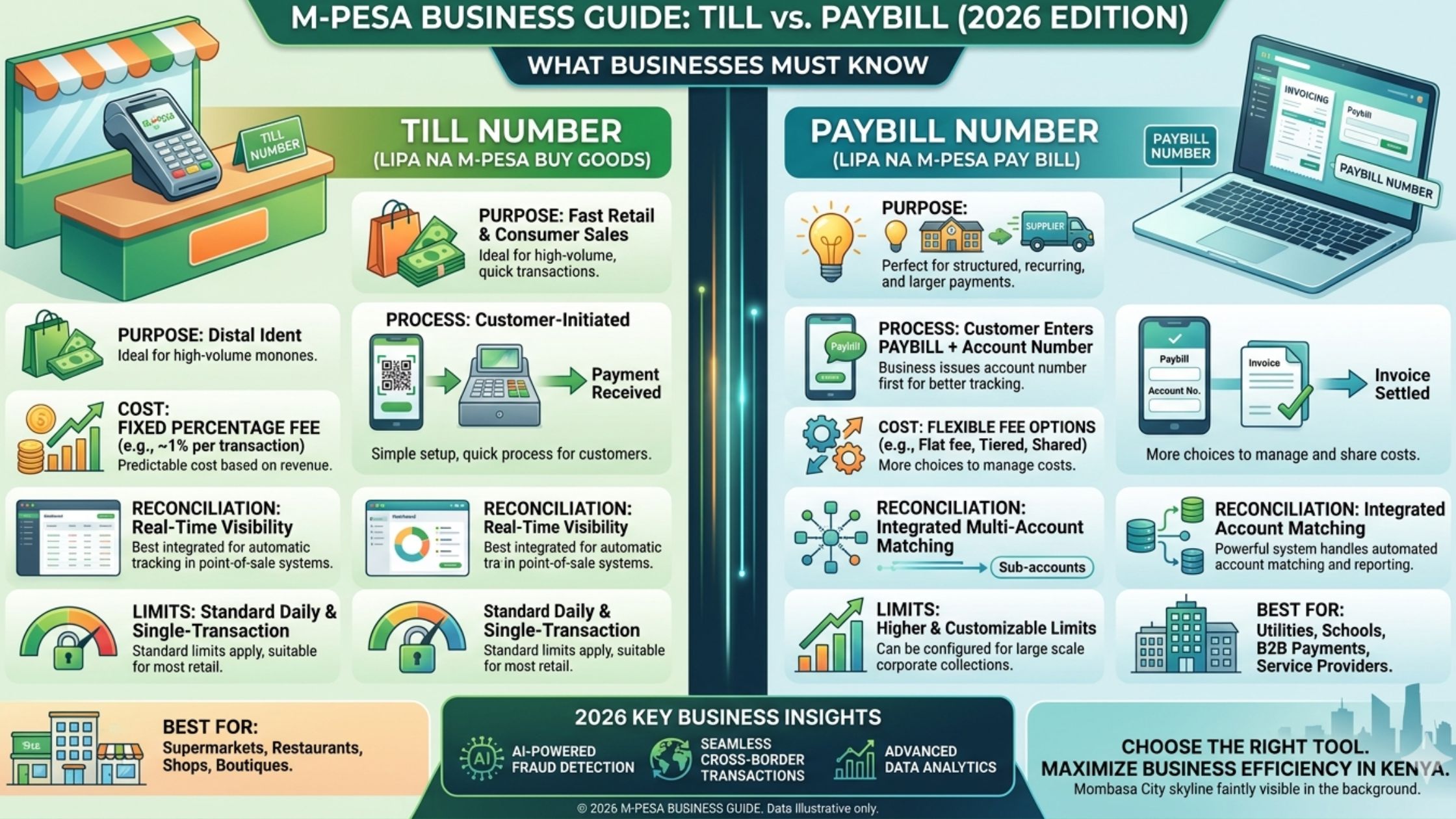
A Till Number — officially called the Buy Goods and Services option on M-Pesa — is a business payment tool that lets customers send money directly to your business account using a short numeric code. When a customer pays via Till Number, they open M-Pesa, select Lipa na M-Pesa → Buy Goods and Services, enter your Till Number, enter the amount, and confirm. The money arrives in your Till wallet almost instantly.
The Till Number experience is simple for the customer because it requires only one piece of information: your Till Number. There is no account number, no reference field, no additional step. This simplicity makes it the fastest payment experience for face-to-face transactions.
What most business owners don’t know: When a customer pays via Till Number, the customer pays the M-Pesa transaction fee — not you. This is the opposite of many business owners’ assumption. The customer’s M-Pesa charges them the standard Lipa na M-Pesa fee based on the amount, and the full amount you quoted arrives in your Till wallet untouched.
Money in your Till wallet can be withdrawn to a linked bank account or to mobile money. Withdrawal fees apply and are covered in the cost section below.
Till Numbers suit businesses that:
- Sell goods or services face to face
- Have a fixed physical location (shop, salon, restaurant, market stall)
- Receive payments from walk-in customers
- Want the fastest, simplest customer payment experience
- Do not need to track which customer paid what at the point of payment
What Is an M-Pesa Paybill Number? (And Who It Is Actually For)
A Paybill Number is a business payment tool that gives customers an additional field — an account number — when making payment. When a customer pays via Paybill, they open M-Pesa, select Lipa na M-Pesa → Paybill, enter your Paybill business number, enter an account number you specify, enter the amount, and confirm.
That account number field is the entire difference between Paybill and Till — and it is a more powerful difference than most people appreciate. Because you control what the account number means, one Paybill number can serve unlimited use cases simultaneously:
- A school uses one Paybill but asks parents to enter their child’s admission number as the account number — every payment automatically matches to the right student
- A landlord uses one Paybill but asks tenants to enter their house number — rent reconciliation becomes automatic
- An online business uses one Paybill but asks customers to enter their order number — no more calling customers to ask which order they paid for
- A freelancer uses one Paybill but assigns each client a code — income from each client is tracked without a spreadsheet
This account number flexibility makes Paybill infinitely more useful for businesses that receive payments from multiple people for multiple purposes. The tradeoff is a slightly more complex customer experience — two pieces of information instead of one.
Paybill Numbers suit businesses that:
- Receive payments from multiple clients or customers that need to be tracked individually
- Operate online or remotely (no face-to-face payment)
- Invoice clients and need to match payments to specific invoices
- Have multiple revenue streams, branches, or product categories
- Are registered businesses that need clean financial records for loan applications
- Collect subscription payments, school fees, rent, or any recurring payment
Side-by-Side Comparison: Real Costs in Shillings
Understanding the cost structure of each option determines which one makes financial sense for your specific business volume.
Setup Costs
| Till Number | Paybill Number | |
|---|---|---|
| Via Safaricom directly | Free | Free |
| Via a bank | Free | Free |
| Registration requirement | ID + business permit | ID + business registration |
| Processing time | 1–7 days | 3–14 days |
| Monthly maintenance fee | None | None |
Both options are free to set up. Neither charges a monthly fee. The cost difference lies entirely in withdrawal fees and transaction charges.
Transaction Fees: Who Pays What
Till Number (Buy Goods): The customer pays the M-Pesa transaction fee. You receive 100% of the amount charged. There is no per-transaction cost to you as a business owner.
Example: Customer pays KES 500 via Till Number. They are charged KES 11 by Safaricom. You receive KES 500.
Paybill: The fee structure on Paybill varies by how it is set up. If configured through a bank (the most common method), the fee arrangement is similar to Till — the customer typically pays. Some third-party Paybill configurations pass fees to the business. Confirm your specific fee arrangement with the institution that issues your Paybill.
Withdrawal Fees: Moving Money to Your Bank Account
This is where the real cost comparison matters. Both Till and Paybill money must eventually be withdrawn to a bank account. The withdrawal fees are charged to you as the business owner.
Current M-Pesa Business Withdrawal Fees (to bank account):
| Amount | Fee |
|---|---|
| KES 100 – 1,500 | KES 16 |
| KES 1,501 – 3,000 | KES 22 |
| KES 3,001 – 5,000 | KES 32 |
| KES 5,001 – 10,000 | KES 52 |
| KES 10,001 – 35,000 | KES 82 |
| KES 35,001 – 50,000 | KES 110 |
| KES 50,001 – 150,000 | KES 175 |
| KES 150,001 – 250,000 | KES 230 |
Strategy to minimise withdrawal fees: Withdraw less frequently in larger amounts. A business withdrawing KES 30,000 weekly pays KES 82 — or KES 4,264 per year. The same business withdrawing KES 5,000 daily pays KES 52 × 6 times weekly = KES 312 per week — or KES 16,224 per year. Batching withdrawals saves over KES 11,000 annually on the same transaction volume.
Verify current Safaricom tariffs at safaricom.co.ke before setting withdrawal schedules, as fees are updated periodically.
The Full Annual Cost Comparison
For a small business processing KES 200,000 per month:
| Cost Item | Till Number | Paybill |
|---|---|---|
| Setup | KES 0 | KES 0 |
| Monthly fee | KES 0 | KES 0 |
| Transaction fees | Paid by customer | Paid by customer (most setups) |
| Withdrawals (weekly, batched) | ~KES 4,000–5,000/yr | ~KES 4,000–5,000/yr |
| Reconciliation time | High (manual matching) | Low (account number does it) |
| Total annual cost | ~KES 4,500 | ~KES 4,500 |
The direct financial cost is essentially identical. The real difference is in time saved on reconciliation — which for a business receiving payments from multiple customers or for multiple purposes is worth far more than any fee difference.
The 3 Scenarios: Which One Your Business Actually Needs
Scenario A: The Physical Shop, Market Stall, or Salon
You sell goods or services face to face. Customers arrive, buy, and pay on the spot. You need payments to arrive instantly and the checkout process to be fast — a customer standing at your counter doesn’t want to enter two pieces of information.
Answer: Till Number.
Reasons: Customers enter one number and confirm. No account number confusion. The transaction completes in 15 seconds. For high-volume retail, the simplicity translates directly into a faster queue and better customer experience. Boda boda operators, mama mboga, small hardware shops, and walk-in service businesses all benefit from this simplicity.
Scenario B: The Online Business, Freelancer, or Service Provider Who Invoices Clients
You work remotely or send invoices. Clients pay for specific work, specific orders, or specific billing periods. You need to know who paid and what they paid for without calling every client after every payment.
Answer: Paybill.
Reasons: You assign each client or invoice a unique account number. When the payment arrives, M-Pesa records both the amount and the account number — meaning your payment notification already tells you which client paid and what for. For a freelancer managing ten active clients, this eliminates hours of monthly reconciliation.
Scenario C: The Growing Business with Multiple Revenue Streams or Locations
You have a main shop, an online component, and rental income, or you run multiple branches. You want one payment system that handles everything cleanly.
Answer: Paybill with a structured account number system.
Reasons: Create a simple internal account numbering structure. Example:
- SHOP-001 for walk-in retail
- ONLINE-001 for online orders
- RENT-101, RENT-102 for rental units
All payments arrive under one Paybill number. Your M-Pesa statement automatically categorises every payment by revenue stream without any manual sorting. This level of financial organisation also produces the clean transaction records that banks and SACCOs use to determine your business loan limits.
How to Get a Till Number: Step by Step
Method 1: Via Safaricom Directly
What you need:
- Your original National ID
- A business permit or business registration certificate (even a county single business permit works)
- An active Safaricom line registered in your name or your business name
Process:
- Visit any Safaricom shop or Safaricom Care Centre
- Ask for a “Buy Goods Till Number” for your business
- Complete the application form — takes approximately 20 minutes
- Submit your ID and business permit copies
- Receive your Till Number via SMS within 1–7 business days
- Activation confirmation arrives by SMS with your Till Number and instructions
Method 2: Via Your Bank (Recommended for Cleaner Records)
Most major Kenyan banks — KCB, Equity, COOP, NCBA, and Absa — offer Till Numbers that link directly to your business bank account. Payments flow automatically from your Till wallet to your account, reducing your manual withdrawal steps.
What you need:
- An active business bank account
- Business registration documents
- Your ID
Process:
- Visit your bank’s business banking desk (not the general queue — specifically request the business desk)
- Ask for an M-Pesa Till Number linked to your business account
- Complete the bank’s business M-Pesa application
- Processing takes 3–7 business days
- Activation via SMS
Why bank-linked is better: Payments received automatically sweep to your bank account, creating a clean transaction trail that your bank uses to assess your business loan eligibility. Every shilling processed through a bank-linked Till builds your business credit profile.
Testing Your Till Number
Before telling customers your Till Number, test it yourself. Send a small amount (KES 10) to your own Till Number from your personal M-Pesa. Confirm the amount arrives in the Till wallet and that the Till name displayed to the sender matches your business name exactly. This avoids customers questioning whether they’re paying the right recipient.
How to Get a Paybill Number: Step by Step
Method 1: Via Your Bank (Most Common and Recommended)
Every major Kenyan bank offers Paybill numbers to business account holders. This is the most common method because it links Paybill receipts directly to your bank account and produces automated bank statements usable for loan applications.
What you need:
- Active business bank account (not a personal account)
- Business registration certificate or certificate of incorporation
- KRA PIN certificate for the business
- Business permit
- Your ID as the business owner or director
Process:
- Visit your bank’s business banking department
- Request a Paybill number for your business M-Pesa account
- Complete the Paybill application form — specify your intended use (retail, rental, school fees, etc.)
- The bank verifies your business registration documents
- Paybill is activated within 3–14 business days
- You receive your Paybill business number and instructions for your account number structure
Method 2: Via Safaricom Business
For businesses that don’t have or want a business bank account, Safaricom can issue a Paybill directly.
- Visit safaricom.co.ke/business or a Safaricom shop
- Apply for a Paybill under the Business section
- Requirements similar to the bank method
- Processing 5–10 business days
Setting Up Your Account Number Structure
This is the step most new Paybill owners skip and later regret. Before your first payment arrives, decide what your account numbers mean.
Simple examples:
- Client-based: Use each client’s name or phone number last four digits as their account number
- Invoice-based: Use your invoice numbers (INV-001, INV-002) as account numbers
- Category-based: Use RENT, SHOP, ONLINE as account categories
- Date-based: Use the month and year (JAN26, FEB26) for subscription or retainer businesses
Whatever system you choose, write it down and communicate it clearly to payers. Include the account number format in every invoice you send, every payment instruction you give, and on any signage that displays your Paybill number.
The One Thing Most Small Business Owners Get Wrong
The biggest mistake Kenyan small business owners make with M-Pesa payments is using a personal M-Pesa line for business transactions instead of setting up a Till Number or Paybill.
This seems harmless — it avoids the registration process and starts working immediately. But it creates four serious problems that compound over time:
Problem 1: No business transaction history. KCB, Equity, NCBA, and the Hustler Fund all use your business M-Pesa or bank transaction history to calculate your business loan limit. Every shilling processed through a personal line is invisible to any business lending algorithm. A business that has processed KES 500,000 through a personal M-Pesa line has exactly the same business loan limit as a business that started yesterday. You are building a financial record that belongs to you personally, not to your business.
Problem 2: Tax and KRA complications. Personal M-Pesa transactions mixed with business income create an accounting nightmare when KRA requests records. Business income received on a personal line looks indistinguishable from personal transfers, making it difficult to demonstrate legitimate expenses and deductions.
Problem 3: CRB exposure. Personal M-Pesa limits are tied to your personal credit profile. A business spike in transactions — a good month — can trigger Safaricom’s fraud detection on a personal line, temporarily freezing your ability to receive payments during your busiest period.
Problem 4: Professional credibility. A customer who sends money to “JOHN KAMAU” personal number has less confidence than one who sends to “KAMAU HARDWARE TILL 123456.” Business payment channels signal legitimacy. For online businesses especially, professional payment details are part of your brand.
The solution is simple and free: Set up a Till or Paybill this week. The registration process takes one visit and one afternoon. Every payment from that point forward builds your business financial identity.
Can You Have Both a Till Number and a Paybill?
Yes — and some businesses genuinely benefit from having both. A common setup for a growing Kenyan SME:
- Till Number for walk-in retail customers — fastest experience for face-to-face payments
- Paybill for invoiced clients and online orders — account number tracking for remote payments
There is no Safaricom restriction on holding both. You manage two separate payment channels, each suited to a different customer interaction type. The additional complexity is worth it when your business genuinely operates in both contexts.
Frequently Asked Questions
Do I need a business registration to get a Till Number or Paybill?
For a Till Number, a county single business permit is usually sufficient. For a Paybill, especially via a bank, formal business registration (business name registration via eCitizen or certificate of incorporation for limited companies) is typically required. Business name registration via eCitizen costs KES 1,050 and takes 3–5 days — a worthwhile investment that also opens access to business bank accounts and business Hustler Fund limits of up to KES 500,000.
Can customers on Airtel or Telkom pay a Till Number or Paybill?
No. M-Pesa Till Numbers and Paybill numbers work only within the M-Pesa ecosystem — Safaricom customers only. Airtel Money and T-Kash customers cannot pay an M-Pesa Till or Paybill. If your customers include significant numbers of Airtel users, consider also registering for an Airtel Business account separately. In practice, M-Pesa’s dominant market share in Kenya means most customers can pay via Till or Paybill without issue.
How do I withdraw money from my Till or Paybill wallet?
For a bank-linked Till or Paybill: withdrawals sweep automatically to your linked bank account on a schedule you set (daily, weekly, or per transaction above a threshold).
For a non-bank-linked Till: dial the Till management USSD code provided during registration and select “Withdraw to Bank” or “Withdraw to M-Pesa.” Withdrawal fees apply as per the table above.
What is the maximum transaction limit on a Paybill or Till Number?
Current Safaricom business limits: single transaction maximum of KES 150,000, daily limit up to KES 500,000. These limits can be increased by applying through Safaricom Business for higher-volume businesses. Verify current limits at safaricom.co.ke/business as they are updated periodically.
Can I link my Till or Paybill to any Kenyan bank?
Yes. Safaricom’s M-Pesa business payment system supports all major Kenyan commercial banks including KCB, Equity, COOP, NCBA, Absa, Standard Chartered, Family Bank, and others. Your bank’s business banking desk handles the linking process — it is part of the same registration process.
What if my business name is taken as a Till Name?
Safaricom registers Till names on a first-come basis. If your preferred business name is already in use by another Till, you will need to use a variation — adding your county, a descriptor, or your registration number. This is another reason to register sooner rather than later, especially in competitive urban markets where common business names fill up quickly.
How long does it take to start receiving payments after registration?
Till Number activation typically takes 1–7 business days after submitting complete documents. Paybill activation via a bank takes 3–14 business days. Plan your payment infrastructure at least two weeks before you need it. Do not assume you can register today and start collecting payments tomorrow.
Your Next Step: One Visit, One Afternoon
The difference between a business that builds financial history and one that doesn’t is not revenue — it is payment infrastructure. A KES 50,000-per-month business with a registered Till Number and bank account is building a loan eligibility profile every single day. The same business collecting on a personal M-Pesa is invisible to every lender in Kenya.
The decision is straightforward:
- Physical, face-to-face business: Go to your bank or nearest Safaricom shop this week and register for a Till Number. Bring your ID and business permit.
- Online business, freelancer, or multi-stream business: Visit your bank’s business desk and apply for a Paybill. Bring your business registration, KRA PIN certificate, and ID.
Both are free. Both take one visit. Both start building your business financial identity from the first payment received.
M-Pesa tariffs and registration requirements verified March 2026. Safaricom fees are updated periodically — confirm current rates at safaricom.co.ke/business before making decisions based on specific fee amounts. Registration requirements may vary by bank and by business type.
Related reading:
- Hustler Fund Kenya 2026: How to Access the Business Loan Up to KES 500,000
- How to Avoid CRB Listing in Kenya 2026: What Banks Won’t Tell You
- M-Shwari vs KCB M-Pesa vs Fuliza 2026: Which Is Cheapest?
- CRB Kenya 2026: How to Check, Clear and Protect Your Credit Record
- Top Unit Trust Funds in Kenya 2026: Ranked by Returns