How to File KRA Returns in Kenya 2026: Step-by-Step for First-Timers
If you have a KRA PIN, you are legally required to file KRA returns in Kenya by June 30, 2026 — even if you earned nothing, even if your employer deducts PAYE automatically, even if you have never filed before. Missing the deadline costs you KES 2,000 in penalties. Filing takes under 30 minutes and costs nothing.
This guide shows you exactly how to file KRA returns in Kenya 2026, step by step, written for someone who has never done it before. No accounting jargon. No assumptions. Just every screen, every field, every click — in plain language.
Who Needs to File KRA Returns in Kenya 2026 (Most People Get This Wrong)
The most dangerous misconception about KRA returns in Kenya is that they only apply to business owners and high earners. They don’t. The rule is simple: if you have a KRA PIN, you must file. No exceptions.
This means:
Employed Kenyans whose employer deducts PAYE must still file. Your employer pays tax on your behalf every month, but you are separately required to file an annual return confirming what was earned and paid. Most employed Kenyans file a simplified return that takes under 15 minutes because the hard work — the tax calculation — has already been done via PAYE.
Freelancers, consultants, and self-employed Kenyans must file and declare all income earned during the year. This includes M-Pesa business income, online work, and any consulting fees received.
Students and unemployed Kenyans with a KRA PIN must file a nil return — a declaration that you earned no income during the year. This takes under five minutes.
Retired Kenyans must file if they have a PIN, even if their only income is a pension.
Business owners file both a personal return and a business return.
The Penalty for Not Filing
Failing to file KRA returns in Kenya by June 30 attracts a penalty of KES 2,000 for individuals and KES 5,000 for companies — charged automatically by KRA even if you owe zero tax. This penalty applies even if your employer deducted every shilling of tax correctly. The filing obligation is separate from the payment obligation. You must file regardless.
Additionally, a clean KRA filing history is increasingly required for:
- Bank loan applications (many banks now verify iTax compliance)
- Government tender applications (mandatory for tenders above KES 500,000)
- Visa applications to several countries
- Employment at financial institutions and government positions
- SACCO loan applications above certain thresholds
Filing protects your financial life well beyond just avoiding the KES 2,000 penalty.
What You Need Before You Start: The KRA Filing Checklist
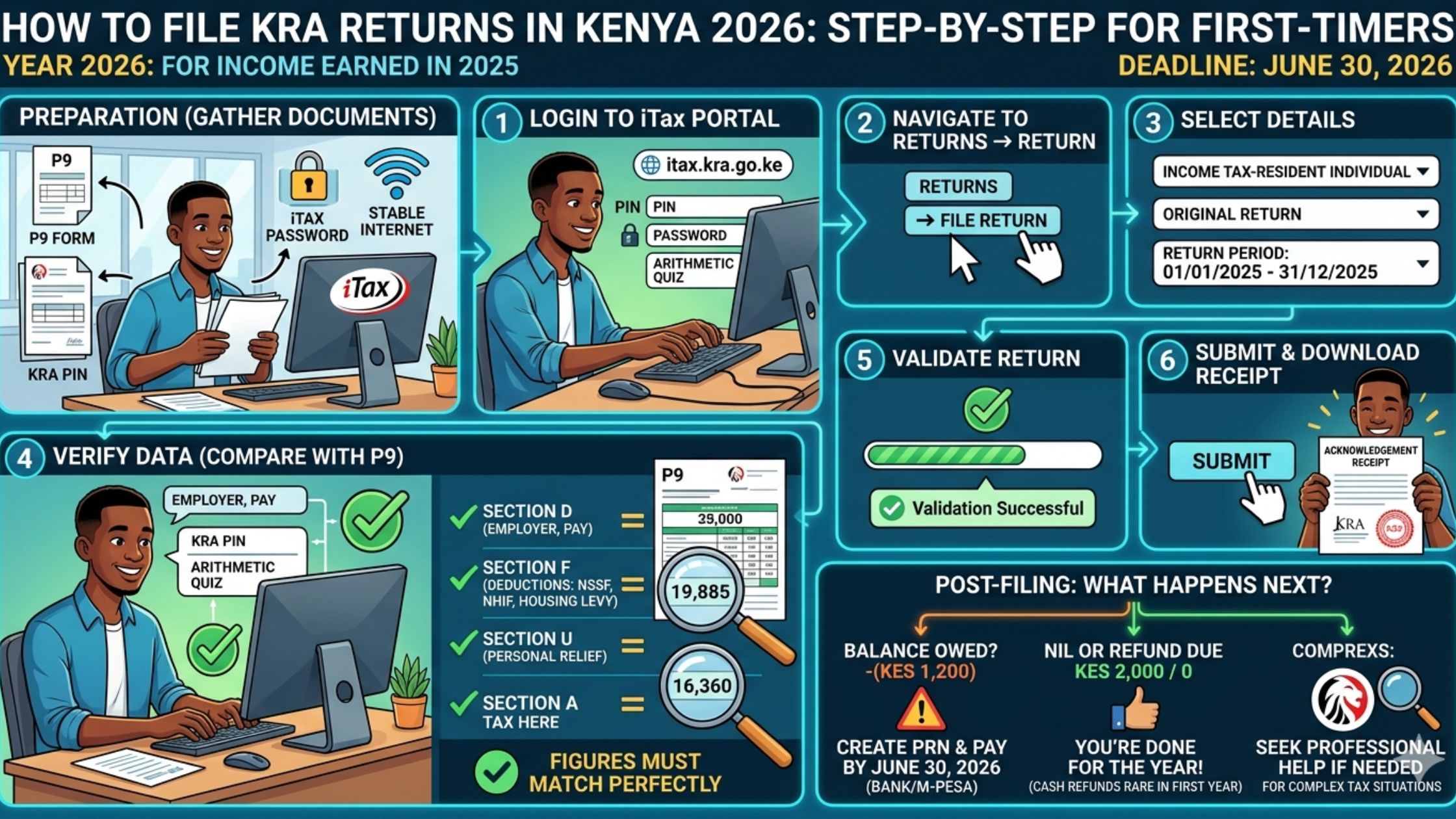
Gather these before sitting down to file. Having everything ready means you won’t get stuck halfway through.
For all filers:
- Your KRA PIN (format: A0123456789B — find it on any KRA letter, iTax email, or by visiting itax.kra.go.ke)
- Your iTax password (if forgotten, the reset process is covered in the next section)
- A desktop or laptop computer (iTax works very poorly on mobile browsers — use a computer)
- A stable internet connection (the iTax portal times out easily)
For employed Kenyans (PAYE):
- Your P9 form from your employer — this is the most important document. It shows your gross annual salary, total PAYE deducted, NHIF contributions, and NSSF contributions for the entire year January–December 2025. Your HR or payroll department provides this, usually by February each year. If yours hasn’t sent it, email HR today and request it specifically.
For freelancers and self-employed Kenyans:
- Total income records for January–December 2025 (bank statements, M-Pesa statements, invoices)
- Any business expense records you want to claim as deductions
- KRA PIN of any clients who paid you above KES 24,000 (you may need to declare these)
For all filers:
- KRA PIN of your spouse if married and claiming spouse relief
- Your NHIF and NSSF membership numbers if not captured on P9
How to Log Into KRA iTax and Reset a Forgotten Password
Step 1: Open your browser and go to itax.kra.go.ke
Step 2: Enter your KRA PIN in the first field (the long alphanumeric code starting with A)
Step 3: Enter your password and click Log In
If you’ve forgotten your password: On the login page, click “Forgot Password.” Enter your KRA PIN and registered email address. KRA will send a password reset link to that email. Check your spam folder if it doesn’t arrive within five minutes. If you no longer have access to the registered email, visit the nearest KRA service centre with your original National ID — they can update your email and reset the account.
Step 4: Once logged in, you will see the iTax dashboard. The main menu at the top includes: Returns, Payments, Ledger, and Certificates. For filing, you will use the Returns menu.
How to File KRA Returns in Kenya 2026: Employed Kenyans (PAYE)
This covers the majority of readers — Kenyans with a regular employer who deducts PAYE monthly.
Step 1: Download the Return Template
From the iTax dashboard:
- Click Returns in the top menu
- Select File Return
- Under “Tax Obligation,” select Income Tax — Resident Individual
- The system will ask for the Return Period. Select:
- Year: 2025
- Period: Jan 2025 to Dec 2025
- Click Next
- A page will appear with a link to download the return template. Click Download and save the Excel file to your computer. The file is called something like IT1_2025.xls or similar.
Step 2: Open the Excel Template
Open the downloaded Excel file. You will see multiple tabs at the bottom. For most employed Kenyans, you will only need to work with:
- Sheet 1 (Basic Info): Your personal details — pre-filled from your KRA registration, verify they are correct
- Sheet 2 (Employment Income): Where you enter your P9 data
- Sheet M (Tax Computation): Automatically calculated — do not edit this
Step 3: Enter Your P9 Data
Click on the Employment Income tab. You will see fields for:
Employer PIN: This is your employer’s KRA PIN — found at the top of your P9 form. It begins with P (for companies) and is nine digits.
Employer Name: The name of the company you work for, exactly as on the P9.
Gross Pay: The total gross salary for the full year January–December 2025. This is on your P9 — not your monthly salary multiplied by 12, but the exact annual figure from the P9 (these can differ due to bonuses or changes).
PAYE Tax Deducted: The total PAYE your employer deducted and remitted during the year. On the P9 this is labelled “Tax Charged” or “Tax Deducted.”
NHIF Contributions: Total NHIF deducted for the year.
NSSF Contributions: Total NSSF deducted for the year.
Enter each figure carefully. Do not add commas — iTax reads numbers only, no formatting.
Step 4: Claim Your Personal Relief
This is the step that most first-time filers miss, and it matters. Every resident individual in Kenya is entitled to a personal relief of KES 28,800 per year (KES 2,400 per month). This amount is deducted from your tax liability.
In the Excel template, look for the Personal Relief field — it is usually pre-populated with 28,800. Confirm it is there. If it is missing or zero, enter 28,800 manually.
Insurance relief: If you pay premiums for a life insurance, health insurance, or education policy in your own name, you may claim 15% of premiums paid as relief, up to KES 5,000 per month. Enter the annual premium in the insurance relief field and the system calculates your relief automatically.
Step 5: Check the Tax Computation Sheet
Click on the Tax Computation tab. This sheet calculates automatically based on what you entered. Do not edit any cells here. Check:
- Tax Payable — if this is zero or shows a refund, you are done
- Tax Already Paid (PAYE) — should match what was on your P9
- Balance Due or Refund — if your employer deducted correctly, this should be zero or a small refund
If the balance shows a large amount owed, go back and recheck your P9 figures — a data entry error is almost always the cause.
Step 6: Save and Upload the File
Save the completed Excel file to your computer. Go back to the iTax portal (keep it open in your browser — do not close it or you’ll need to start again).
On the iTax filing page, click Upload Return File. Browse to the Excel file you saved and select it. The system will upload and validate the file. If there are errors, iTax will display them in red — fix them in the Excel file and re-upload.
Step 7: Submit and Download Your Acknowledgement
Once the file validates successfully, click Submit. The system will process your return and display a confirmation screen. Immediately:
- Download the Acknowledgement Receipt — click the download link and save the PDF. This is your proof of filing and you will need it for loan applications, visa applications, and tender submissions.
- Check your registered email — KRA sends a confirmation email within a few hours. Save this as well.
Your return is now filed. The process is complete.
How to File KRA Returns in Kenya 2026: Freelancers and Self-Employed Kenyans
If you earned income from freelancing, consulting, online work, rental property, business operations, or any income outside a formal PAYE employment, your return is more involved but follows the same basic structure.
Declaring Your Income
In the Excel return template, look for tabs covering Business Income or Other Income in addition to the employment income tab. If you had both employment income and freelance income in 2025, you fill in both tabs.
For your freelance or business income, you will need:
- Total gross income earned January–December 2025 from all sources
- Allowable business expenses you want to deduct
What Expenses You Can Deduct
KRA allows deductions for expenses that are wholly and exclusively incurred in earning the business income. Common allowable deductions for freelancers include:
- Internet costs (if used for work)
- Equipment purchased for work (laptop, camera, tools) — depreciated over several years, not all at once
- Transport costs related to work
- Rent for a home office (proportional — if your office is one room of four, 25% of rent is deductible)
- Professional subscriptions and software tools
- Marketing costs
Keep records (receipts, M-Pesa statements, invoices) for all expenses you claim. KRA can audit and you must be able to substantiate every deduction.
The 2025/2026 Tax Bands
Your taxable income (gross income minus allowable deductions) is taxed at Kenya’s graduated personal income tax rates:
| Annual Taxable Income | Rate |
|---|---|
| First KES 288,000 | 10% |
| Next KES 100,000 (up to KES 388,000) | 25% |
| Above KES 388,000 | 30% |
After calculating tax at these rates, subtract your personal relief of KES 28,800. The result is your net tax payable.
Paying Any Tax Owed
If your return shows tax payable after deducting PAYE already paid and your personal relief, you must pay before or at the time of filing.
To pay:
- On iTax, go to Payments → Generate Payment Slip
- Enter the amount owed
- Download the payment slip — it contains a unique payment reference number
- Pay via M-Pesa Paybill: 572572
- Account number: your KRA PIN
- Amount: exact figure from payment slip
- Keep the M-Pesa confirmation — attach it to your filing
If you genuinely cannot pay the full amount, contact KRA before the deadline to arrange an instalment payment plan. Ignoring the amount owed is always the wrong choice — penalties and interest accrue daily.
How to File a KRA Nil Return in Kenya 2026
If you have a KRA PIN but had no income during 2025 — you are a student, unemployed, or did not earn any taxable income — you still must file a nil return. The process is the fastest of all filing types.
Step 1: Log into iTax at itax.kra.go.ke
Step 2: Click Returns → File Nil Return
Step 3: Select Income Tax — Resident Individual as the tax obligation
Step 4: Select the return period: January 2025 to December 2025
Step 5: The system asks you to confirm you had nil income. Confirm and click Submit.
Step 6: Download the acknowledgement receipt immediately.
That is the entire process. It takes under five minutes. The KES 2,000 penalty applies equally to nil returns not filed — there is no exemption for having no income.
The 7 Most Common KRA Filing Mistakes (And Exactly How to Avoid Them)
These are the errors that cause rejected returns, incorrect tax calculations, and unnecessary KES 2,000 penalties. Knowing them in advance makes you faster and more accurate than most filers.
Mistake 1: Filing under the wrong tax obligation. Employed Kenyans file under “Income Tax — Resident Individual (IT1).” Businesses file under “Income Tax — Resident Company.” Self-employed individuals with a business registration file under the business category. Filing under the wrong obligation means the return is invalid and you still owe the penalty.
Mistake 2: Not claiming personal relief. You are entitled to KES 28,800 per year. Failing to claim it means overpaying tax. The field is in the Excel template — verify it contains 28,800 before submitting.
Mistake 3: Entering the employer’s PIN in your own PIN field. Your personal PIN starts with A. Your employer’s PIN starts with P. Entering your employer’s PIN in the employee field is a common first-timer error that causes validation failure.
Mistake 4: Filing for the wrong year. The 2026 filing season covers income earned January–December 2025. Select 2025 as the income year, not 2026. Filing for the wrong year means you are still non-compliant for the correct year.
Mistake 5: Not saving the acknowledgement receipt. iTax generates your receipt once and you must download it immediately. If you close the page without downloading, the receipt is retrievable from the portal under Returns History, but many first-timers don’t know this. Download it the moment it appears.
Mistake 6: Using a mobile browser. iTax’s Excel download and upload functionality works inconsistently on mobile. Use a laptop or desktop computer. If you genuinely have no computer access, visit any KRA service centre — they have computers available for public use and staff to assist.
Mistake 7: Waiting until June 29. The iTax portal experiences extremely heavy traffic in the final days before the June 30 deadline. The system slows significantly and sometimes becomes inaccessible. File in April or May. The return window opens January 1 and the filing experience is significantly smoother the earlier you file.
What Comes After Filing: Compliance Certificate and Next Steps
Your KRA Tax Compliance Certificate
A Tax Compliance Certificate (TCC) is a document confirming that you have filed all required returns and have no outstanding tax obligations. It is different from your acknowledgement receipt — the receipt proves you filed, the TCC proves you are fully compliant.
You will need a TCC for:
- Government tenders (mandatory for all tenders above KES 500,000)
- Employment at banks, telcos, and government agencies
- Some SACCO loan applications above KES 500,000
- Business partnership agreements
- Some visa applications
How to get your TCC:
- Log into iTax
- Click Certificates → Apply for Tax Compliance Certificate
- The system checks your compliance automatically
- If compliant, the certificate is issued instantly as a PDF
- It is valid for 12 months from issue date
- It is free
If your TCC application is rejected, it means iTax has flagged an outstanding return or payment. Check your filing history and payment ledger on iTax to identify what is missing.
How to Amend a Return
If you discover an error in a submitted return, you can amend it. On iTax, go to Returns → Amend Return, select the relevant period, and re-file with the corrected figures. Amended returns are accepted within certain timeframes — contact KRA directly if the amendment window has closed.
How to Check Your Compliance Status
At any time, you can check your KRA compliance status by logging into iTax and looking at your Ledger — it shows all returns filed, payments made, and any outstanding obligations. This is the same view a lender or government agency sees when they verify your KRA compliance.
Frequently Asked Questions: KRA Returns Kenya 2026
What is the KRA returns deadline for 2026?
June 30, 2026 for individuals. This covers income earned January 1 to December 31, 2025. The deadline is fixed every year and KRA rarely extends it. File by May to avoid the last-minute system overload.
What happens if I miss the KRA returns deadline in Kenya?
A KES 2,000 late filing penalty is charged automatically for individuals. KES 5,000 for businesses. Additionally, any unpaid tax attracts a 5% late payment penalty plus 1% monthly interest until paid. File as soon as possible even after the deadline — the penalty is fixed and does not grow, but the interest on unpaid tax does.
How do I get my P9 form from my employer?
Email your HR or payroll department and request your P9 form for the year ended December 31, 2025. It should have been provided to you by February 2026. If your company is small and doesn’t issue P9s formally, ask payroll for your annual gross pay, total PAYE deducted, total NHIF, and total NSSF deducted for 2025 — these four figures are what the P9 contains.
Can I file KRA returns on my phone?
Technically yes, but practically very difficult. The iTax portal requires downloading and uploading an Excel file, which most mobile browsers handle poorly. For nil returns (which require no Excel file), a phone browser works adequately. For income returns, use a laptop or desktop — or visit a KRA service centre.
What if I have no income — do I still need to file KRA returns?
Yes. A nil return must be filed even with zero income. The KES 2,000 penalty applies to everyone with a KRA PIN who does not file, regardless of whether they owe any tax.
How do I get a KRA PIN if I don’t have one?
Visit itax.kra.go.ke and click “New PIN Registration.” You will need your National ID number and a working email address. Registration is free and the PIN is issued immediately online. You will need your PIN to file, open bank accounts, purchase property, and access most financial services in Kenya.
Can I file KRA returns for previous years I missed?
Yes. iTax allows you to file returns for previous years. Go to Returns → File Return and select the relevant year. You will owe the KES 2,000 penalty per year missed, but filing late is always better than not filing. Outstanding returns appear on your iTax ledger and prevent you from getting a Tax Compliance Certificate until cleared.
Is the KRA iTax portal safe?
Yes. iTax is KRA’s official government portal. The URL is itax.kra.go.ke — note the kra.go.ke domain. Beware of phishing sites with similar names. Never share your iTax password with anyone, including people claiming to be KRA agents. KRA staff at service centres have their own admin access and do not need your password.
Your Action Plan: File Today in 4 Steps
Filing KRA returns in Kenya 2026 does not require an accountant, a tax agent, or any prior experience. It requires 30 minutes, your P9 form, and a computer.
Step 1: Go to itax.kra.go.ke and log in. If your password has expired, reset it via your registered email before sitting down to file.
Step 2: Request your P9 form from HR if you haven’t received it. Email them today — “Please send my P9 form for the year ended 31 December 2025.” That’s the entire email.
Step 3: Set aside 30 minutes this week — not next month, this week — and work through the steps in this guide from the beginning.
Step 4: Download your acknowledgement receipt the moment it appears and save it to a folder labelled “KRA 2026.” You will need it.
The June 30 deadline feels distant until it doesn’t. The KES 2,000 penalty is entirely avoidable. The Tax Compliance Certificate that becomes available after filing opens doors for loans, tenders, and employment that remain closed without it.
Thirty minutes. One deadline. File now.
KRA iTax processes and tax rates verified March 2026. Tax bands, relief amounts, and deadlines are subject to change — verify current figures at kra.go.ke before filing. If your tax situation is complex (multiple income sources above KES 1 million, rental income, international income), consider engaging a registered tax agent.
Related reading: